Review

Sirui Swift M1 ... BE CAREFUL

I was very excited to bring you this post because I was recently sent the Sirui Swift M1, a new mobile gimbal soon to be released. As far as I know, I’m the first to really showcase this gimbal and it seemed very promising based on the marketing that I’ve seen. Unfortunately, getting hands on time with this device proved otherwise. Within minutes of unboxing, I ran into some issues that has entirely made me give up on this device and at this point, I have to say that I cannot recommend the Sirui Swift M1.

Let’s first talk about the design. In my opinion, the Swift M1 is just poorly designed. This gimbal utilizes a folding design to save on space when not in use. The folding design is one that a few other newer mobile gimbals have employed but if you look at those, they are much simpler. Those gimbals usually feature something like the phone mount section folding over the handle. With the M1, we have something similar but with multiple points of articulation and multiple places to fold. In practice, this makes the gimbal more difficult to fold down. Sure, once you understand how everything works and get used to the procedure, folding the gimbal becomes easier, but in my opinion, it never feels right. The gimbal is primarily made of plastic and after a few folds, I actually noticed some black dust that resulted from the plastic parts rubbing against each other. The plastic was essentially being shaved off as I locked/unlocked the gimbal. Also, with the force needed to lock/unlock some of the points, it just feels like I’m eventually going to break something.

Maybe this won’t happen and I hope that it doesn’t, but there’s another problem with the folding procedure. With the way that it’s situated, I can almost guarantee you that there will be damage to the gimbal handle purely from the folding and unfolding the gimbal. This is mainly because of the phone holder on the gimbal. It wraps around the handle and when the points are unlocked/unfolded, the phone mount hits against the handle, causing damage. Literally after my first attempt at unfolding my M1, the handle was left with some very noticeable scratches.

There is really nothing that I enjoy about the Swift M1’s folding design. It’s fiddly and just doesn’t work very well. It’s main purpose is to save space but because I dislike the folding procedure so much, I just leave the gimbal unfolded until I know that it’s going away for storage.

Different people may have different opinions on the folding design. Some may like it and think that I’m just being nitpicky and that’s fine. But there’s one thing that really ruined this gimbal for me. If you watch the video above and were paying attention, you’d notice that the OLED screen on the gimbal was on the entire time. This is not supposed to be so. It’s only supposed to be on when the gimbal is powered on and in use. My M1’s screen being on essentially tells you that it’s bricked. Although the screen is on, there’s no power to the gimbal’s motors as if it was off. The gimbal is stuck in some middle state that doesn’t allow me to do anything, not even restart it. The gimbal is essentially paperweight at the moment. This happened after updating the firmware. Like many other gimbals, you go in the app, click update firmware, it goes through the process and restarts the gimbal. Except with mine, it restarted the gimbal in the bricked state. So as of right now, my M1 is useless. The only idea that I have to try and fix it is to let the battery die and hopefully it’ll restart properly when charged back up. The main problem with this plan is, like I said, the gimbal is basically off and the only thing that’s on is the screen which draws little to no power. The gimbal has been on for days and the screen still shows a full charge so powering it down can possibly take weeks if not months, but that’s all that I can really do. I just have to wait it out.

I’m so glad that this product was sent to me for free because had I purchased it with my own money, I would be PISSED. Don’t get me wrong, aside from the folding design, this was actually a pretty good gimbal when it was working. It is feature rich and functioned like it should until the firmware update ruined everything. Because it’s a firmware issue, I have little doubts that this is something that Sirui can’t fix. Hopefully, when they see this, they’ll pull the bad firmware and update it before this happens to anyone else.

If you’re reading this and are interested in purchasing the Swift M1, I would recommend you to be careful. Realize that the folding design is finicky. It works but is definitely not the best implementation. You have to be one of those people who are ok with scratches or this is not the device for you. Also, DO NOT update the firmware unless you can get an absolute confirmation that it will not brick your gimbal. Make sure that the firmware has been fixed. Other than that, I hope the gimbal works out for you. Like I said, it functions pretty well and has a lot of cool features.


Want to support my work?

Consider visiting the shop and buying "Absolutely Nothing"
https://www.HaiHoangTran.com/shop/absolutely-nothing

or

Become a Patron!
https://www.patreon.com/HaiHoangTran

or

PayPal
https://www.PayPal.me/HaiHoangTran

FeiyuTech AK4500

When it comes to gimbals, there are a few brands that essentially dominate the market. This forces everyone else to really up their game and throw as much as they can at the consumer to try and make some sales. One of those brands is FeiyuTech and this, the new AK4500 embodies this motto.

If you’re new to FeiyuTech, the AK4500 is essentially an upgrade to the AK4000. I personally did not have a good experience with the AK4000 and publicly said that it was the worst gimbal that I’ve ever tried, but how is the AK4500?

AK4500SET_1400x.jpg

First off, the AK4500 comes with many of the same accessories as the AK4000. We get the follow focus, carbon fiber extension pole, tripod feet, along with a bunch of other minor things.

Looking at the handle, we see that the controls are the same. Same touchscreen, same joystick and same button layout. We have an updated multifunction knob but that’s not too big of a deal.

Turning on the gimbal, I did notice that there were a few updates to the firmware. First, the menu system looks a lot cleaner and easier to navigate. I find the settings to be pretty straightforward and easier to understand on a first look basis. Someone who’s used to electronic gimbals can pick the AK4500 up and get going pretty quickly. Even if you’ve never used a gimbal before, this menu makes it pretty easy to figure out the modes and settings.

However, it does seem like FeiyuTech is focusing more on the firmware side of things. It seems like they’ve added more features to the touchscreen’s firmware but have actually taken away some of the features of the physical buttons. With the AK4000, the mode button allows you to switch between panning and lock mode with a single tap. Double tap and the gimbal will switch to follow mode. Triple tap and it’ll enter all follow mode. The AK4500 only allows you to switch between panning and lock mode with the single tap and gets rid of the double and triple tap functions. With the AK4000, aside from turning the gimbal on/off by long pressing the power button, a single tap will enter rolling follow mode and triple tap will rotate the pan axis 180 degrees to enter selfie mode. The AK4500’s power button gets rid of all other functions and only allows you to turn the gimbal on/off. With the Ak4500’s missing features on the mode button, that’s really only a problem if you need to be on any other screen besides the default which allows you to switch between the modes with a single tap. However, as a vlogger, I’m really missing the selfie mode shortcut on the power button. I really hope FeiyuTech adds that back or give me another button to assign it to because activating it in the menu is a pain when you have to do it over and over again while vlogging throughout the day.

Aside from the firmware, there are some other nice upgrades with the AK4500.

The AK4500 can now support a maximum payload of 4.6kg, upgraded from the AK4000’s 4kg max payload. The difference may not seem that much on paper, but the more the merrier because I found that the AK4000 often times struggled with payloads nowhere near the advertised max payload. The AK4500’s stronger motors are going to make using larger camera setups much more enjoyable.

This gimbal now features a lock button on the three main axis. This means that you can individually lock the pan, tilt and roll axis. This feature is nice because it makes balancing a lot easier. Say you’re balancing the roll axis and the other axis aren’t balanced and they’re moving around everywhere, well now you can just lock them down and focus on the roll axis. This feature also makes traveling with the AK4500 much easier than other gimbals. Being able to lock these axis down means that when you’re moving around with the gimbal, the upper section of the gimbal and your camera isn’t shifting around as you move. This is a simple feature but has become a must for me because it is so useful.

Another big update with the AK4500 is the quick release plate system used to mount and dismount a camera. This is now more of a double quick release system because it utilizes two different plates. There is a longer bottom plate that attaches to the gimbal and it is Manfrotto compatible. The shorter plate attaches to the camera and that one is Arca Swiss compatible. The idea behind this is that when you get everything balanced out, you can still quickly and easily remove the camera without having to rebalance after putting it back on. The longer plate that attaches to the gimbal is the one that adjusts your balance while the smaller plate is strictly used to mount the camera to the longer plate and gimbal so it doesn’t have an effect on balance. This is a pretty smart system and works pretty well. The only drawback is that you’re essentially locked into using the smaller plate that comes with the AK4500. You have to be committed to this plate and Arca Swiss or you’ll have to install another quick release plate system if you want to use another plate or just switch the plates on and off.

Perhaps the most notable addition to the AK4500 is this new handle which FeiyuTech calls the Hyperlink Controller. You can attach the handle to the gimbal for a more comfortable carry during underslung mode or you can take it off completely and use it as a wireless controller. The handle allows for mode changes and adjustments of the gimbal either via the joystick or just by moving the handle around. This can be extremely useful in many situations. One would be when there are multiple camera operators. This handle allows for one person to control and focus on moving the gimbal around an area while another person can focus on adjusting the gimbal’s parameters. This accessory opens up a whole new world of possibility and just a few years ago, something like this would cost us thousands of dollars to achieve. To have it here in this package is simply amazing.

This brings me to the price. The FeiyuTech AK4500 retails for $749. That’s not exactly cheap, but it is competitive. Considering all the accessories that you get and the capabilities of this gimbal, it is hard to overlook. Like I said earlier, to compete FeiyuTech has essentially thrown everything at us in terms of features and I would have to say that it worked. The AK4500 as a whole is a very compelling package and one worth checking out.


If you're considering on buying any of the products mentioned, please support my work by using the links below.

FeiyuTech AK4500 https://amzn.to/2lfsXN5

FeiyuTech AK4000 https://amzn.to/2lfPpWp


Want to support my work?

Consider visiting the shop and buying "Absolutely Nothing"
https://www.HaiHoangTran.com/shop/absolutely-nothing

or

Become a Patron!
https://www.patreon.com/HaiHoangTran

or

PayPal
https://www.PayPal.me/HaiHoangTran

NEVER Buying from Robert Larson Toyota of Tacoma Again

I recently purchased a 2019 Toyota Tacoma from Robert Larson Toyota of Tacoma in Lakewood, WA. At the time, everything seemed like sunshine and rainbows but today, I’d like to share with you the story of how purchasing my dream truck turned out to be possibly the worst buying experience that I’ve ever had and how I was scammed by this dealership.

Let’s start from the beginning. I had just purchased a 2019 Toyota Corolla Hatchback from this dealership and felt that I was in the position to buy another vehicle. I wanted to buy my favorite truck and that is the Toyota Tacoma. So, I returned the following day and went through with buying it. The overall purchasing experience was not bad. Everything went through, I purchased the truck and thought that it was all good.

After purchase, things started to slowly fall apart and issues came to light. The first thing was the condition of the truck at delivery. It had this dirt and gunk all over the body. From what I was told, new vehicles arrive with a protective wrap that is removed at the dealership. When left over time, the wrap develops dirt along the edges and that’s what it was that I was seeing. So they took the truck back and “detailed” it again only for some spots to be overlooked and there to still be gunk on the truck. I was told to not worry about it because when I bring my car in for Cilajet, the technician would have to completely detail the truck and all of the gunk would be gone.

At this point, I have to step back and talk about Cilajet. In short, this is a paint sealant. The manufacturer, of course, makes a lot of claims about their product and how amazing it is. I never heard about Cilajet prior to buying the Corolla and the Tacoma. I’m one of those people who don’t believe in extended warranties. I buy the vehicle, gamble with what I get and usually that works out. But surprisingly, because this is my dream truck and I intend to keep it until it breaks down, I bought all the important extended warranties. I bought a warranty to protect the mechanical components. I bought a warranty to cover the tires, keys, dents and dings. I bought a warranty to cover all the electrical because a lot of the truck is electronically controlled. I was worried that I wouldn’t be able to fix the truck myself if something were to happen so better to be safe than sorry. I essentially bought all the warranties to cover the internals of the vehicle. At this point, all there was left is the to cover the cosmetics. This is how I was sold on Cilajet. When I was in the financing office, I was told that if I got Cilajet, the entire truck would be protected from scratches. As in, if I got a scratch for ANY reason, even if someone comes up and keys the truck, Toyota would take it in and fix the issue. I made sure that this was the case before buying and made sure that multiple people heard what was being promised. I wanted my truck to be protected from scratches. I was assured that this is so, so I purchased the Cilajet. Well, shortly after contacting Cilajet itself, I found out that this isn’t true. Cilajet will cover nothing near that. It’s a paint sealant so it’ll cover defects that relate to that subject. You can do your own research but just know that they don’t cover scratches like what I was looking for and was told. So, that was the first major red flag. Funny enough, when I purchased all of these warranties, I was told that if I ended up not wanting them, I can come back any time and get a pro-rated refund. Well, can you guess what was non-refundable? Cilajet.

Another issue that I had with the Cilajet was that it wasn’t applied properly. I’m no expert on this but from what I’ve seen, it’s applied like a wax. You put it on the paint and buff it in. Remember earlier when I told you about how there was gunk from the protective wrap on my car and how it was supposed to be cleaned when I got the Cilajet applied? The gunk turned out to be an indicator of the poor application of Cilajet. I was looking at the car after Cilajet was applied and remnants fo the gunk was still there. This shows that the Cilajet wasn’t thoroughly applied. I had to schedule for reapplication but I think that they just redid the spot that I showed them, the spot where the gunk was because the first time around, application took 4 hours. This time along with other services, it took less than 2 hours. I have my doubts about what was actually done. Since I paid for it, I would love to have the Cilajet properly installed but again it has to be buffed into the finish. A car only has so much clear coat. I don’t want them to keep going at my finish especially when I don’t know what’s actually done since the technician can’t get it right. As far as the Cilajet, it is what it is. I took a major loss by paying the hundreds for it and I can’t do anything about it now. But the problems don’t stop there.

b.jpg

I was checking out the Tacoma and noticed something weird. My driver window wouldn’t fully go up. It was siting just below the weather stripping and there was a noticeable gap. When I touched the window’s glass, it was actually loose. It shifted around easily. I checked the other windows and this wasn’t happening anywhere else. This is concerning because I’m in Washington. This state is known for the rain and having a window that doesn’t close all the way isn’t exactly what you want. There was actually a big thunderstorm the night that I noticed the gap and I had to tape the window up. Imagine that, taping up the window of a car you just bought.

After noticing this, I began to really inspect the car. I removed the front bumper license plate bracket and noticed that it was hiding a deep gouge in the bumper. I went under the frame and more gouges and even surface rust. SURFACE RUST ON A BRAND NEW TRUCK?!?! ON THE FRAME!!!

A.jpeg
A.jpg

Let me also point out that the truck only has about 100 miles on it. 50 of which was before I even bought it, from other test drivers. Even in the 50 miles that I’ve put on it, I’ve had to go back and forth from the dealership about 7 times to deal with all the issues so I’ve only done about 20 miles worth of personal driving. Can you imagine having these kind of issues when you’ve only had a car for 20 miles?

At this point, I was done. I took the truck to the dealership and showed them the problems. They scheduled me for the next day. The window was fixed and the minor Cilajet reapplication was done. I asked about the frame and the bumper. Well, it turns out that this truck was a dealer trade. This means that they got the truck from another dealership to sell. When Toyota of Tacoma got the truck, they didn’t do an exception on it like they were supposed to. I assume that they just looked at it, said yeah it’s a new truck, its good for sale. They sold it to the next person that wanted it and that just happened to be me. They admit that they didn’t do an inspection, but said that nothing can be proven about the damages. They can’t prove that the other dealership cause the damage, the can’t prove that it was damaged at their dealership and they can’t prove that I didn’t cause the damage after purchase. I can understand this train of thought, but had Toyota of Tacoma actually inspected the vehicle, we would know where the damages came from and under who’s ownership. At the end of the day, because they didn’t do a proper inspection, like they are supposed to, they didn’t know about the damages so they couldn’t tell me about it. I bought this truck without knowing it’s actual condition and because of the dealership’s mistake, I’m paying for it. I now have to get the rust removed and treated. I now have to deal with a damaged bumper. Now, instead of looking at the Tacoma and being happy that I got my dream truck, I see it as a reminder to never buy from Robert Larson Toyota of Tacoma again.


IMG_1691.jpg

There’s something else that I wanted to mention that didn’t fit into the timeline of the story above, so here it goes.

When I purchased the Tacoma, I got in the transaction a genuine Toyota bed mat. They didn’t have the mat in stock so ordered one in. It arrived and had chunks missing. It was as if something scraped really hard against it and took pieces out. I requested an exchange and they ordered another in.

The second mat arrived in even worse condition. Between the rubber layers of the mat are metal cords. The second mat was so damaged that the cords were visible in many locations. This is a problem because the cords could damage whatever you put on the mat. I requested for another exchange and the parts representative told me that “I can exchange it but I don’t know if it’ll be any better”. When I heard this, I was just amazed by the response. I was amazed that the quality control of this product was so bad that the rep didn’t think that it could get better than a mat that had the metal cords exposed.

Nevertheless, I wanted to see for myself so they ordered in a third mat. At this point, I told myself that I’m just going to take it no matter what. Well, it’s definitely not perfect. The third mat arrived with a bunch of discoloration and stains. It was a mess, but I took it. The dealership was obviously not going to take care of me.

It should also be noted that with all of these mats, the dealership never bothers to contact me when the mats arrive. I had to call back everyday and ask if the mat was available.

In hindsight, these experiences should’ve been a red flag and an indicator of the quality of service to come.


Want to support my work?

Consider visiting the shop and buying "Absolutely Nothing"
https://www.HaiHoangTran.com/shop/absolutely-nothing

or

Become a Patron!
https://www.patreon.com/HaiHoangTran

or

PayPal
https://www.PayPal.me/HaiHoangTran

Vemico 3rd Party Camera Batteries

It’s outrageous what original manufacturers charge for their branded batteries. This is why I’m a big proponent of 3rd party camera batteries and why I’ve always purchased them for my personal cameras. When a rep. for Vemico reached out to me for a possible review, I jumped on the opportunity because you can never have too many spares (especially if you use older Sony mirrorless cameras).

I currently use two types of Sony batteries, the NP-FW50 and the NP-FZ100. The NP-FW50 currently costs $49.99 each and the NP-FZ100 costs $78 each at the time of this post. My first Sony camera was the A7RII. One complaint often made about this camera is that it has poor battery life. This is simply because the NP-FW50 battery that it uses is small and the A7RII uses a lot of power. I currently own 7 NP-FW50 batteries and EASILY go through 4 batteries on a full day’s work. The A7RIII improved on battery life with its larger NP-FZ100 battery and I currently own 2 of them. I’ve been able to shoot an entire wedding with one battery with some intermittent charging during down time in between events. This larger battery is greatly appreciated but it comes at a cost. $78 per battery is a bit steep, which is why I only own 2.

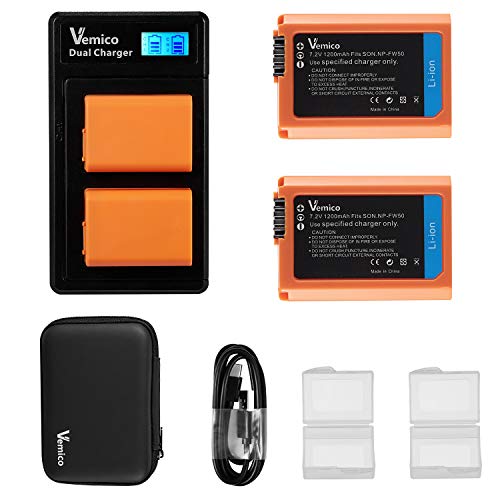
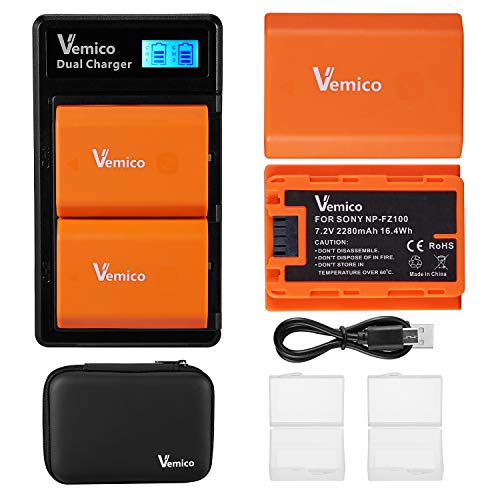
This is where the Vemico batteries come in. The Vemico NP-FW50 battery set currently sells for $31.99 for TWO batteries, two battery cases, a dual battery charger, a UBS-C cable and a carrying case that holds everything. The Vemico NP-FZ100 battery set comes in a similar package and costs $52.99. Compared to OEM, the Vemico options are an absolute steal EVEN IF we were getting just the batteries, which we’re not. Even compared to other 3rd party battery manufacturers, Vemico’s prices are still very competitive if not better.

Over the years, I’ve tried quite a few batteries from different 3rd party manufacturers. Although they’ve all worked, I’ve never been overly satisfied. I’ve never done any scientific testing, but I’ve always felt that the OEM batteries were better or have more of a charge. One thing to note about 3rd party batteries is that they very often will advertise a very high mAh capacity, higher than that of the OEM battery. This is great, but it’s often just false advertising and the batteries drain pretty quick. Again, I haven’t done any testing but this is how I feel after years of experience with my batteries. Even so, it is still cheaper to buy multiple 3rd party batteries than one OEM battery. You can buy more than enough 3rd party batteries to compensate for the difference in battery capacity.

The quick drain was something that I was also expecting with the Vemico batteries. I can’t vouch for their long term use as I’ve only been using them for a week, but from my initial uses, I can tell that these batteries work much better than the other 3rd party brands that I’ve tried. During usage, they seem to last much longer and the battery percentage indicator doesn’t drop as quick.

One thing that I’ve found interesting about the Vemico batteries is their ability to hold a charge when the camera is off. If you didn’t know, many Sony cameras continually draw power even when the camera isn’t on. This is frustrating because you can leave a fully charged battery in the camera for a few hours only to come back to a few percentage gone. This does not seem to be as big of a problem with the Vemico batteries. I’m currently typing this post about 7 hours after shooting 20 minutes worth of 4K video and the battery STILL shows 100%. This is great. Even with my OEM batteries, there is no doubt that the indicator would’ve dropped at least a few percent. *UPDATE* Over 24 hours later and the battery indicator still shows 100%.

IMG_1728.jpg

Another thing that I like quite a bit about these Vemico batteries is the overall presentation. Everything comes in a nice carrying case. Open up the case and you get more cases to hold the batteries. In the case of the NP-FW50 package, you even get precut foam to hold everything in place. The NP-FZ100 set didn’t come with the foam and this is likely because it’s a newer battery and Vemico reuses the same parts throughout there battery line and just didn’t have the foam for it. Either way, the carrying case and battery cases are a nice touch.

The included double battery charger is also appreciated. This is something that you typically have to purchase separately and costs around $10. I have way too many batteries to be using a single battery charger so this is a must! However, the one included is nothing new. I actually have one that’s very similar because these are mass produced chargers that manufacturers buy and slap their logos on. What’s different with this one is the USB-C interface. The charger that I already have uses a micro USB interface. Having USB-C here is a pain because it’s another cord to carry from what I already do for the other chargers but it’s nice to know that this interface will be future proof for awhile.

Overall, I’m pretty happy with these Vemico 3rd party batteries. I’ve been consistently using them and enjoy them as much as I can enjoy batteries. If you’re looking for a cheaper alternative to OEM batteries for your cameras, check out the options from Vemico.


If you're considering on buying any of the products mentioned, please support my work by using the links below.

Vemico Storefront https://amzn.to/2ZNG2eL

Vemico NP-FZ100 Battery Charger Set https://amzn.to/2PIX3qT

Vemico NP-FW50 Battery Charger Set https://amzn.to/2NLA9wa


Want to support my work?

Consider visiting the shop and buying "Absolutely Nothing"
https://www.HaiHoangTran.com/shop/absolutely-nothing

or

Become a Patron!
https://www.patreon.com/HaiHoangTran

or

PayPal
https://www.PayPal.me/HaiHoangTran

HOHEM iSteady Mobile+

A representative of HOHEM recently contacted me to see if I was interested in trying out their new smartphone gimbal, the iSteady Mobile+. At this point, I own and have tested quite of few gimbals and to be honest, I’m kind of tired of them. Unless something crazy comes out, I just kind of pass on them. Nevertheless, I wanted to see what this product was all about so I headed to the company’s official website. Then, I saw it. A fully featured smartphone gimbal that only costs $89. This would definitely be the cheapest gimbal that I ever tried so I wondered if it was any good. I told the rep to send it over and here it is, the HOHEM iSteady Mobile+.

IMG_1724.JPG

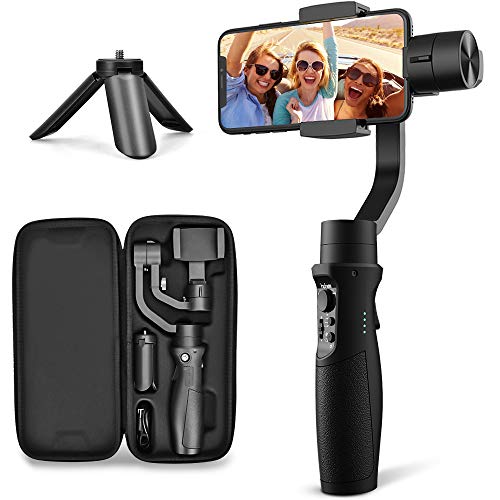
First, let’s take a look at the design of this product. It’s pretty straight forward and looks like many other smartphone gimbals. It’s fairly small and only slightly larger than my hand. This is nice because to me, the whole point of using a phone camera is because of the size and convenience. I want to impede this as little as possible so if I were to use a phone gimbal, it has to be as small as possible.

On the handle we get the gimbal’s controls. A controller wheel to adjust the gimbal’s parameters. A toggle switch which allows for focus and zoom adjustments. A button to toggle between the various gimbal modes. A button to start/stop recording and to take photos. A trigger to activate some more of the gimbal’s features (we’ll get to that in a moment).

Using the mode selector button on the front of the gimbal, we can toggle between 4 of the gimbal’s modes. With this, we can toggle between PF (pan follow), PTF (pan/tilt follow), AL (all lock), and AF (all follow).

IMG_1725.JPG

The trigger on the back allows for a few other uses. Holding it down, we get Sport Mode which increases power to the motors and allows it to react more quickly. This could be useful if you’re trying to follow a fast subject or you can use this feature to create in camera transitions like whip pans. Double tapping the trigger re-centers the motors to its initial position.

As with any modern gimbal that wants to stay in the loop, this gimbal also features inception mode and the ability to shoot in vertical orientation.

What surprises me about this gimbal is its inclusion of face/object tracking. Don’t get me wrong, this is not a new feature, but to see it in a product at this price is really appreciated. I actually like this feature quite a bit. I’ve tried vlogging with a phone in the past but have always found it difficult because I like to record with the rear cameras. I use an iPhone and none of them are currently able to shoot 4K video with the front facing camera. I only produce in 4K so using the front facing camera just doesn’t work for me. I’m used flipping the camera around to get 4k footage but the problem with the iPhone is that framing is a bit difficult when you do this. It’s not just holding the camera out like other cameras, but because of the way that the cameras are laid out, you have to kind of angle the phone a bit and there can be a learning curve to this. But with the iSteady Mobile+’s face detection, all I have to do is flip the gimbal around and it automatically centers me in the frame.

IMG_0033.JPG

Now, this gimbal is by no means perfect. In my short time with it, I’ve noticed some annoyances. First, this is really a gimbal for smaller smartphones, say an iPhone XS not a XS Max. The gimbal cannot balance a larger phone and falls to the left. The adjustment arm just doesn’t move to the right far enough. Another indication that this gimbal is really not for larger phones is the audio ques that you get when the gimbal is pushed. The motors will get really worked up and become very audible, even when you set them to maximum strength in the settings. Although I can still use my XS Max with this gimbal, it can be a struggle with certain modes as the gimbal tries to keep up with the weight.

Another issue that I have with this gimbal is the way that it pans. This kind of goes in hand with trying to do selfies with the rear camera. Many other gimbals have a way to activate selfie mode and the gimbal will actually spin the phone around. The iSteady Mobile+ does not. You have to manually do this one way or another. You would think that you just turn the gimbal around but the pan axis does something weird where it often gets caught somewhere in between and you’ll have to deal with it. If you need to do this, you’ll just have to play with the gimbal and figure out what works best for you. I sometimes use Sport Mode to make the pan axis move faster and trick itself into spinning around or I just hold the vertical bar and force it around. Either way, this is just a waste of time. HOHEM needs to add a selfie mode into the firmware.

IMG_1721.jpg

Finally, I think there is some work that needs to be done in the app. Right now, it’s just not very intuitive to me and I often find myself searching for features or trying to figure out how to do things. The menu and icons can be set up better. I also have a problem with just how small and close everything is. Just look at the icons for subject tracking and the focus/zoom selector (bottom left). They’re so small and when I try to activate these features, I find myself touching the bare screen and the app thinks that I’m trying to adjust exposure. This happens so often and just slows everything down. On the bright side, both this and the panning can realistically be fixed in firmware and I really hope that the people at HOHEM takes note and adjust these things.

This flap never stays in place

This flap never stays in place

To be honest, as a gimbal the HOHEM iSteady Mobile+ is nothing special. It doesn’t revolutionize the gimbal industry and really doesn’t give you anything different. The modes that the iSteady Mobile+ offers are pretty standard. They are the ones that pretty much every other gimbal provides. That’s not to say that that is a bad thing because these are the modes that you will most likely use. The inclusion of face/object tracking and vertical shooting is nice, but again, pretty standard nowadays. This makes the iSteady Mobile+ fall into the crowd and it is a big crowd when you have companies like DJI, Zhiyun and FeiyuTech dominating the market in every sector. But, what those other companies don’t have is a gimbal that has all the standard features and only costs $89.

If you were to ask me for a gimbal recommendation, I would typically reply by saying to research and see which one has the features that you want, but to also consider buying the cheapest option because all modern gimbals essentially do the same thing. In use, they all essentially run off the same modes. What you are really paying for are the minor features beyond using the gimbal for stabilized footage. You’re paying for the ability to add accessories, to fold down to a compact size, to be able to lock the various axis to make travel and balancing easier, and etc. But if you don’t need or want those things, you just want a cheap gimbal so you can go out and shoot video without getting shaky footage, then something like the iSteady Mobile+ is the gimbal for you.


If you're considering on buying any of the products mentioned, please support my work by using the links below.

HOHEM HOHEM iSteady Mobile+ https://amzn.to/2L9TGFb


Want to support my work?

Consider visiting the shop and buying "Absolutely Nothing"
https://www.HaiHoangTran.com/shop/absolutely-nothing

or

Become a Patron!
https://www.patreon.com/HaiHoangTran

or

PayPal
https://www.PayPal.me/HaiHoangTran